All-in-One PackageLatest: v1.9
LLM Runner AIO v1.9
All Local LLM Tools — In a Single .exe File
Node.js and Python 3.11 must be installed on your system before running the app.
Share Your FeedbackOverview
LLM Runner AIO is a comprehensive, self-contained desktop application that bundles every tool you need to run local AI models on your own hardware: Open WebUI, llama.cpp, SearXNG, Pi Coding, Vane and optional Wan2GP video generation. No complex setup, no dependency hell — just download, run, and start using AI locally. 100% open source.
What is Included
Open WebUI
MITFrontend interface for chatting with local LLMs
llama.cpp
MITPre-compiled CUDA 13 + Vulkan inference engine
SearXNG
GPLv3Completely private local web search — Yandex engine included
Pi Coding
Open SourceMinimal agent harness — Web search & Advisor pre-installed (bring your own API key)
Vane
Open SourceWeb search integration — llama.cpp & SearXNG settings pre-configured
Wan2GP
Open SourceOptional AI image/video generation, runs locally — one-click Setup from the System tab
Configured Model Presets
| VRAM | RAM | Models |
|---|---|---|
| 4 / 6 GB | 32 GB | qwen3.6-35B-A3B · gemma-4-26B · gemma-4-E4B |
| 8 GB | 32 GB | qwen3.6-35B-A3B · gemma-4-26B · gemma-4-E4B · qwen3.8-27B |
| 10 GB | 32 GB | qwen3.6-35B-A3B · gemma-4-26B · qwen3.8-27B |
| 12 GB | 32 GB | qwen3.6-35B-A3B · gemma-4-26B · qwen3.8-27B |
| 16 GB | 32 GB | qwen3.6-35B-A3B · gemma-4-26B · qwen3.8-27B (DFlash2 draft) |
| 24 GB | 32 GB | qwen3.8-27B · gemma-4-26B |
| 32 GB | 32 GB | qwen3.8-27B · gemma-4-31B |
| 4 GB | 16 GB | gemma-4-E4B · qwen3.5-4B · Ling-3.0-tiny · MiniCPM5-2B · Spark-X2.5-4B |
| 6 GB | 16 GB | gemma-4-E4B · qwen3.5-9B · Ling-3.0-tiny · MiniCPM5-2B · Spark-X2.5-4B |
Most models ship with chat, vision and coding profiles (Ling-3.0-tiny, MiniCPM5-2B and Spark-X2.5-4B ship with a single profile). All presets can be added, edited, or removed directly from the GUI — no manual INI editing needed.
Features
No Manual Installation Required
A single 2.28 GB .exe file — double-click and wait. Everything is set up automatically within a local virtual environment (venv).
Automatic Hardware Detection
Detects your GPU/VRAM and applies the matching hardware profile (VRAM options: 4, 6, 8, 12, 16, 24, 32 GB).
Smart Model Downloader
Select your auto-detection profile and click Model Download — only models that fit your VRAM are downloaded and configured.
GUI Model Manager
Add, edit, or remove models straight from the System tab — including draft/speculative URLs. Preset INIs are rewritten safely and download URLs stay in sync.
Built-in Video Generation
Wan2GP: install, start, stop and monitor the AI image/video server from the same screen (default port 7860).
Optimized for Coding Agents
Parameters fine-tuned for Qwen and Gemma models to maximize token speed and eliminate formatting or context loop issues.
Speculative Decoding
qwen3.8-27B ships with a DFlash2 draft model for higher token speed in supported presets.
100% Open Source
You can review the entire source code on GitHub.
How It Works
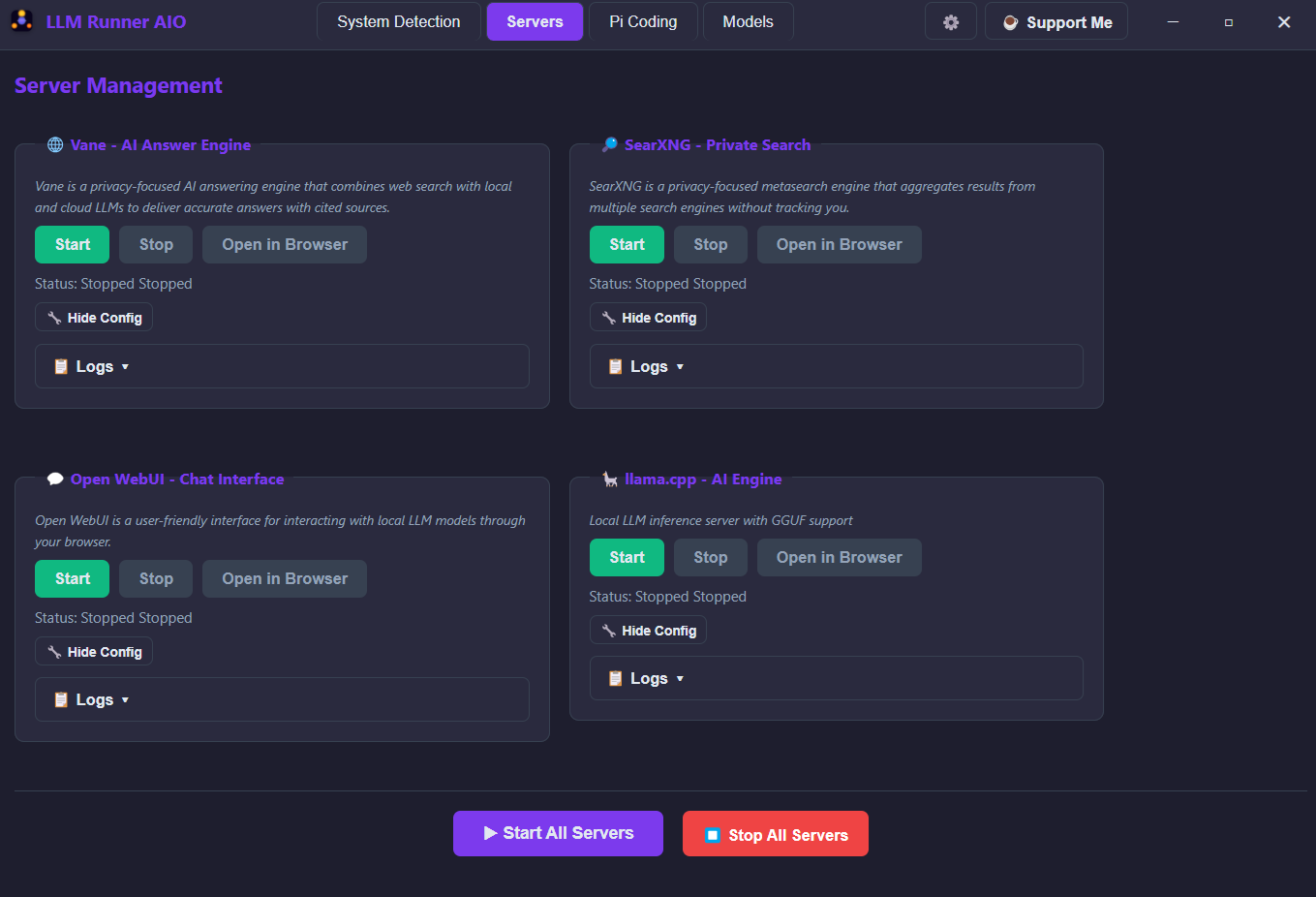
- llama.cpp runs the AI model inference engine at
http://localhost:1234 - Open WebUI provides the chat interface at
http://localhost:3000 - SearXNG enables local web search at
http://localhost:8080 - Vane handles web search at
http://localhost:3001 - Wan2GP (optional) serves AI image/video generation at
http://localhost:7860
Installation
1
Download
Download LLM-Runner-AIO.exe (2.28 GB) from Hugging Face
2
Run
.exe: double-click to execute. .RAR: extract, then run run.bat first — it installs dependencies, configures Pi Coding and creates a desktop shortcut
3
Detect & Download Models
Click System Detection, then Model Download — models are auto-configured for your VRAM
4
Start Servers
Launch all services and access at http://localhost:3000
System Requirements
| Requirement | Minimum | Recommended |
|---|---|---|
| OS | Windows 10/11 | Windows 11 |
| RAM | 8 GB | 16 GB+ |
| VRAM | N/A | 4 GB+ |
| Python | 3.11 (required) | 3.11 (required) |
| Node.js | Latest (required) | Latest LTS (recommended) |
| Wan2GP (optional) | N/A | Few extra GB disk + CUDA/driver matching your GPU generation |
Note: Python 3.11 and Node.js must be installed on your system before running the app. The optional Wan2GP video service needs a few extra GB of disk space and the CUDA/driver version matching your GPU generation (exact requirements are shown in the setup confirmation window).
Data Privacy
- No Cloud Dependencies — Everything runs locally
- No Telemetry — No data is sent anywhere
- Local Database — Chat history stored only on your machine
- No Account Required — No registration or login needed
Supported Languages
🇹🇷 Turkish🇬🇧 English🇪🇸 Spanish🇩🇪 German🇫🇷 French🇵🇹 Portuguese🇨🇳 Chinese🇯🇵 Japanese
Credits
This project would not be possible without the incredible work of:
- • Georgi Gerganov — llama.cpp
- • Open WebUI Team — Open WebUI
- • SearXNG Contributors — SearXNG
- • All open-source contributors who make local AI accessible
Ready to Get Started?
Download LLM Runner AIO and start running local LLMs instantly.
Share Your Feedback
Loading feedback...